



If someone got your password tonight, how far could they get before you even noticed?
We ask because passwords have quietly become a single point of failure for a lot of businesses. They protect email, file storage, accounting, payroll, customer portals, and remote access. One reused password or one convincing login page, and suddenly the wrong person is inside.
That is why cybersecurity conversations keep circling back to the same practical move. Add a second check at login so a password alone cannot open the door.
Table Of Contents
- A Password Alone Should Not Be A Business Plan
- Five Reasons MFA Matters More Than Ever
- Conclusion
- FAQs
Multi factor authentication, often shortened to MFA, is simply a sign-in process that uses more than one proof of identity. Usually it is something you know like a password, plus something you have like a phone prompt or a security key, or something you are like a fingerprint.
A Password Alone Should Not Be A Business Plan
Most of us grew up treating passwords like house keys. Keep it secret, keep it safe, and you are fine. The problem is that digital “keys” get copied all the time.
Here is what we see happening to real teams
- People reuse the same password across multiple tools because it is faster.
- Old employee accounts stay active longer than anyone realizes.
- A vendor portal, a shared mailbox, or a seldom-used admin account becomes the soft entry point.
- Attackers do not need to guess passwords one by one anymore. They try leaked username and password combinations across many services, and eventually something clicks.
MFA changes the math. Even if a password is exposed, the login still needs a second factor that the attacker does not have.
Five Reasons MFA Matters More Than Ever
Passwords get stolen, reused, and phished every day, which means a login can fail long before you notice anything is wrong. Multi factor authentication adds a second checkpoint that blocks most account takeovers even when a password is exposed.
Here are five practical reasons MFA has become one of the smartest, simplest protections you can put in place right now.
1. It Blocks Stolen Passwords From Becoming Access
The most important benefit is also the simplest. MFA stops a password from being a complete set of credentials.
If an attacker buys a password list, pulls credentials from an old breach, or tricks someone into typing their password into a fake page, that password is no longer enough. A push prompt, a one-time code, or a hardware key is now required too.
What you should do:
Pick a second factor that is hard to intercept. In practice, authenticator apps and hardware security keys are usually stronger than text messages, because SMS can be redirected and social engineered more easily. If your platform offers passkeys or a security key option, it is worth enabling for your highest-risk accounts.
What you should not do:
Do not roll out MFA only for “the IT team.” If you protect administrators but leave everyone else on passwords, attackers will just pivot to the easiest user and work their way up.
2. It Turns Phishing Into A Speed Bump
Phishing keeps working because it targets human habits. Someone is busy, a login page looks familiar, and they enter credentials without thinking. MFA helps in two ways.
First, it adds a second checkpoint. If a password is phished, the attacker still needs the second factor.
Second, it can create a moment of truth for the person being targeted. A surprise push notification that says “Approve sign-in” when you are not signing in is a clear signal that something is wrong. That is valuable because it gives your team a chance to reset passwords, revoke sessions, and investigate before the situation spreads.
What you should do:
Teach your team one simple rule. If you get an unexpected MFA prompt, deny it and report it. That is it. No complicated script.
What you should not do:
Do not approve a prompt just to make it go away. That habit is exactly what attackers hope for.
3. It Protects The Accounts That Run Your Business
A lot of “security” advice feels abstract until you map it to the systems you rely on to get paid and keep operating.
If you only enable MFA in a few places, start where compromise would hurt the most. Here is a practical order of operations, and this is the only checklist we will use
- Your email accounts, including shared inboxes
- Your identity provider or single sign-on portal, if you use one
- File storage and collaboration tools
- Payroll, banking, accounting, and merchant services
- Remote access tools, VPN, and remote desktop gateways
- Administrator accounts for cloud services and network equipment
- Any customer portal where a takeover would expose personal data
This is also where we recommend you review who has admin rights, and remove them from anyone who does not truly need them. MFA is strong, but it is even stronger when fewer accounts have the power to change everything.
At Bell Tech Pros, this “protect the crown jewels first” approach usually prevents the most expensive outcomes, even when a smaller account is targeted.
4. It Limits Damage When A Device Goes Missing Or A Login Gets Reused
Lost phones and laptops are normal. So are employees who save passwords in browsers, stay signed in for months, or use personal devices for quick tasks.
MFA will not magically secure an unmanaged device, but it does reduce how far a thief can go. It also helps when an attacker steals a session cookie or tries to reuse a login from a different device. Many MFA systems can challenge sign-ins that look unusual, such as a new location, a new device, or a risky network.
What you should do:
- Make sure your MFA setup includes backup options that you control, like backup codes stored in a secure place, or a second hardware key.
- Require screen locks on phones and laptops used for work.
- Review account recovery settings. If your recovery email is unprotected, or your recovery phone number is outdated, you have a weak link.
One more practical note. People get locked out when they lose their second factor, so plan for that. Backup codes and secondary factors prevent “MFA fatigue” caused by fear of lockout.
5. It Sets You Up For Smarter Access Over Time
MFA is not just an add-on. It is the foundation for the way modern access is heading.
More organizations are moving toward passwordless options like passkeys, and toward access rules that depend on context, like the device you are using and whether it is managed. Some teams call this zero trust, others call it conditional access, but the idea is the same. Do not trust a login just because it has a password.
When MFA is in place, you can make better decisions later, like requiring stronger factors for admin actions, prompting again for high-risk transactions, or tightening access from unknown devices. That is how you keep security from turning into a daily annoyance.
This is one reason many businesses pair MFA with broader managed IT services, because the real win is consistency across accounts, devices, and policies, not one-off settings that drift over time.
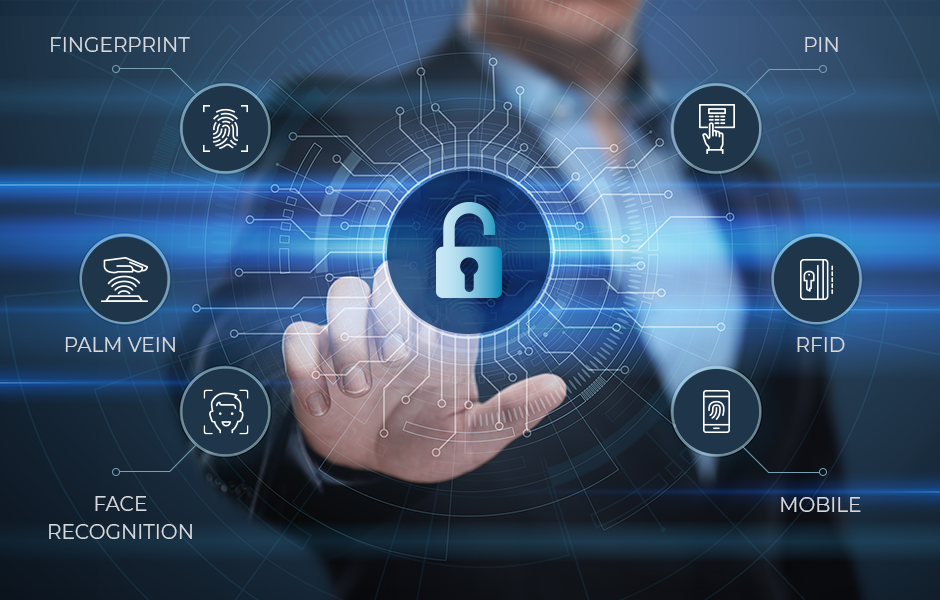
If you are also thinking about physical access and who can enter sensitive areas, the same mindset applies. Digital identity and real-world entry controls should both verify who is requesting access and whether it makes sense. For example, a door system that logs entries and supports multi factor style verification is easier to audit than a handful of shared keycards. If you want to see how that looks in practice, our overview of access control systems is a useful starting point.
Conclusion
MFA is not perfect, but it is one of the cleanest ways to reduce account takeovers without forcing everyone into complicated behavior changes. The goal is to make MFA boring and ubiquitous.
If you want a simple path, protect email and admin accounts first, choose stronger factors where you can, set up recovery the right way, and make sure unexpected prompts are treated like a security incident.
If you are reviewing your overall security posture and want a plain-language overview of how we think about layered protections, you can browse our website and Managed Security service page in context, since MFA is usually most effective when it sits alongside monitoring, access controls, and clear response habits.
FAQ’s
What is the difference between MFA and 2FA?
2FA uses exactly two factors, like a password plus a phone prompt. MFA is the broader category and can use two or more factors. Many people say MFA when they mean 2FA.
Is SMS based MFA better than nothing?
Yes, it is usually better than passwords alone. But if you have the option, authenticator apps, passkeys, or hardware security keys are typically harder to hijack than text messages.
Which accounts should always have MFA turned on?
Email, remote access, cloud admin accounts, financial systems, and any account that can reset other passwords should be first on your list.
How do we avoid getting locked out when we enable MFA?
Set up at least two methods per user, store backup codes securely, and document who can help with recovery. Lockouts are usually a planning problem, not an MFA problem.
Can MFA stop every kind of breach?
No. MFA mainly reduces the risk of account takeover from stolen credentials and phishing. You still need good device security, patching, backups, and clear access policies to cover other failure points.
Make Multi-Factor Authentication Work Right Across Your Business
→ Set up MFA across email, cloud apps, and remote access without slowing your team down
→ Lock down recovery options and high risk accounts so stolen passwords cannot snowball
→ Keep sign ins monitored and access tightened as your business changes
★★★★★ Rated 4.7/5 by 13 Trusted Businesses
Joel Bell is a Microsoft Certified Professional and IT Consultant at Bell Tech Pros, based in Montrose, Colorado. With over 15 years of experience in the tech industry, Joel has earned a reputation for his expertise in systems and network engineering, providing cutting-edge solutions to businesses in the area. His deep knowledge of cybersecurity and dedication to client satisfaction has made him a trusted resource for companies looking to safeguard their digital assets.
Related Articles:
Tech Tips for Growing Your Business in Western Colorado
How a Local MSP Can Help Small Businesses in Grand Junction Compete Big